How to sell on Instagram
Instagram can help a Shopify brand turn product discovery into a website visit. With the current Instagram Shopping flow, a shopper can open a product tag and continue to the Shopify store to complete checkout.
For current requirements and the native setup, read how to add the Shop Now/View Shop path on Instagram. The article below is supporting strategy, not a replacement for the live Shopify and Meta eligibility checks.
 Instagram + Shopify Integration
Instagram Shopping feature allows e-commerce brands to engage better with audiences. It helps to create a digital catalogue of its products on Instagram or import it from Shopify.
Instagram + Shopify Integration
Instagram Shopping feature allows e-commerce brands to engage better with audiences. It helps to create a digital catalogue of its products on Instagram or import it from Shopify.
What is Instagram Shop?
The Instagram shop is a way for businesses to reach out better to their audience. It showcases its products in the form of a catalog and thus helps in increasing conversions.
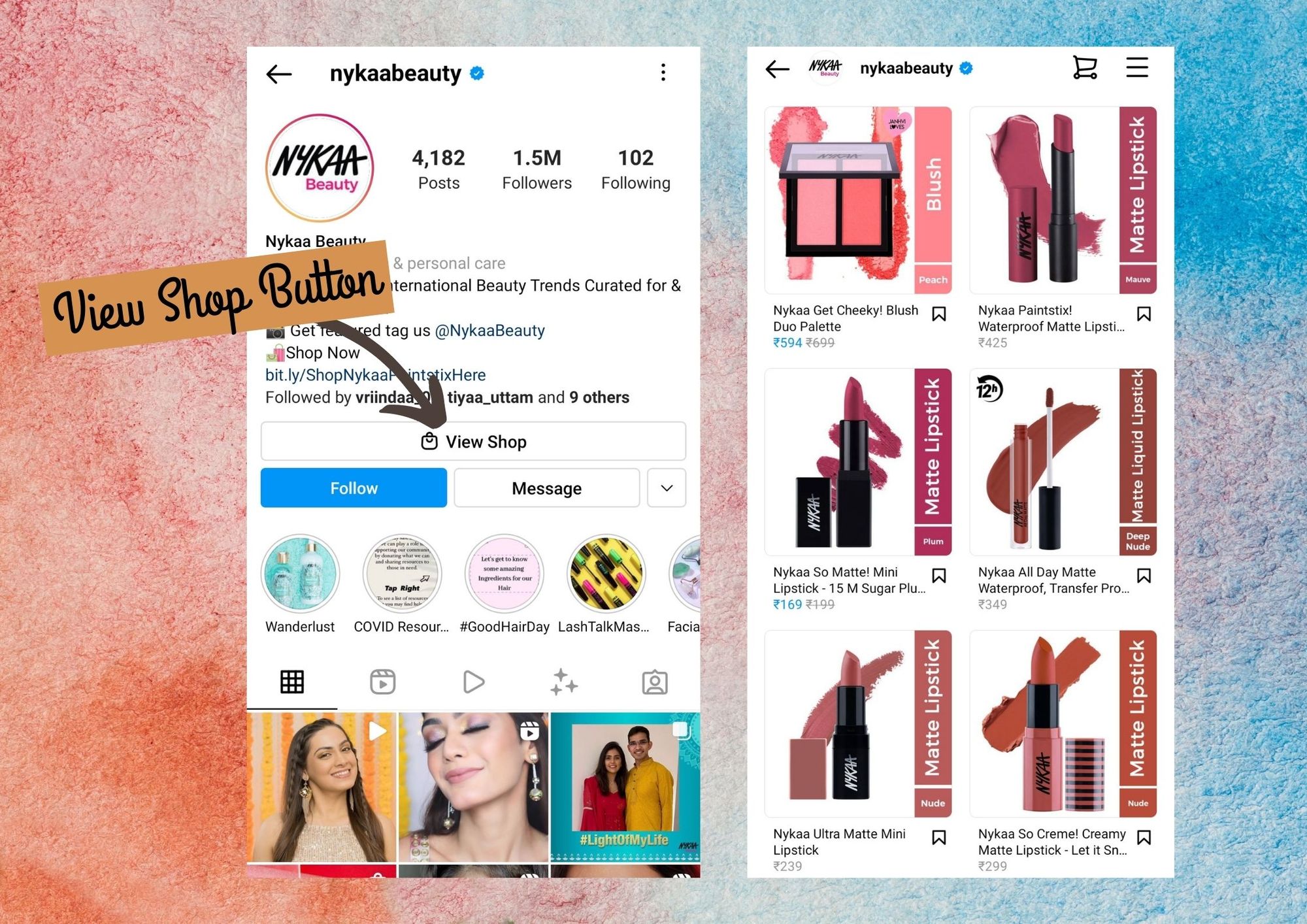 Instagram Shop is set up via the ‘View Shop’ button
You can think of the ‘View Shop’ button as a landing page where the users can browse all your product.
Instagram Shop is set up via the ‘View Shop’ button
You can think of the ‘View Shop’ button as a landing page where the users can browse all your product.
How to connect Instagram to Shopify?
Instagram Shopping helps to connect the items that you have in the Shopify store to your Instagram business profile so that the audience and customers can see your items on Instagram.
Before you add Instagram Shopping to your brand, ensure that you have a Facebook business Page, a professional Instagram account, the required Meta business assets, a verified domain, eligible products, and a supported market. See the canonical setup checklist.
After converting your Instagram profile into a professional account, add Instagram shopping to the Facebook sales channel.
Steps:
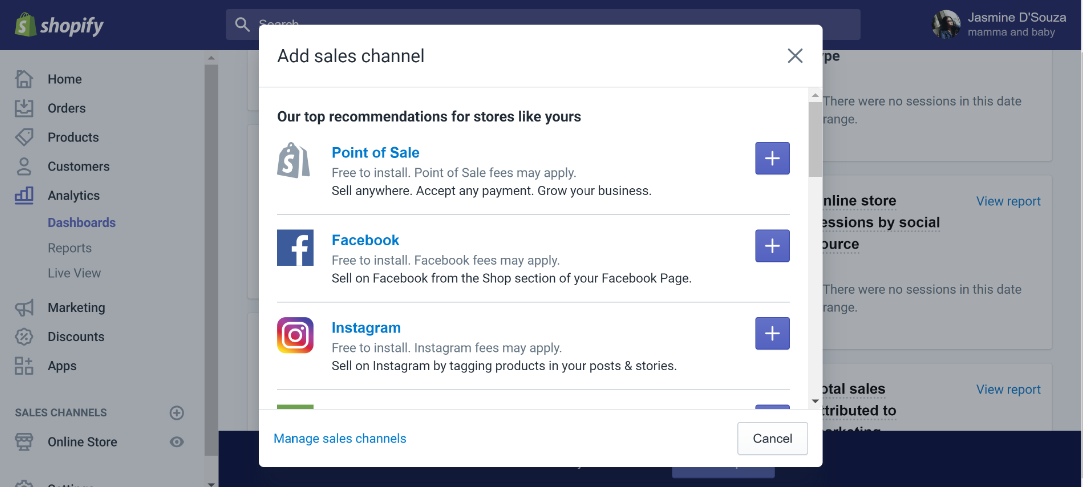
- From the Shopify admin screen, click “+” beside the ‘sales channel’
 2. Click on **Facebook sales channel** > Overview
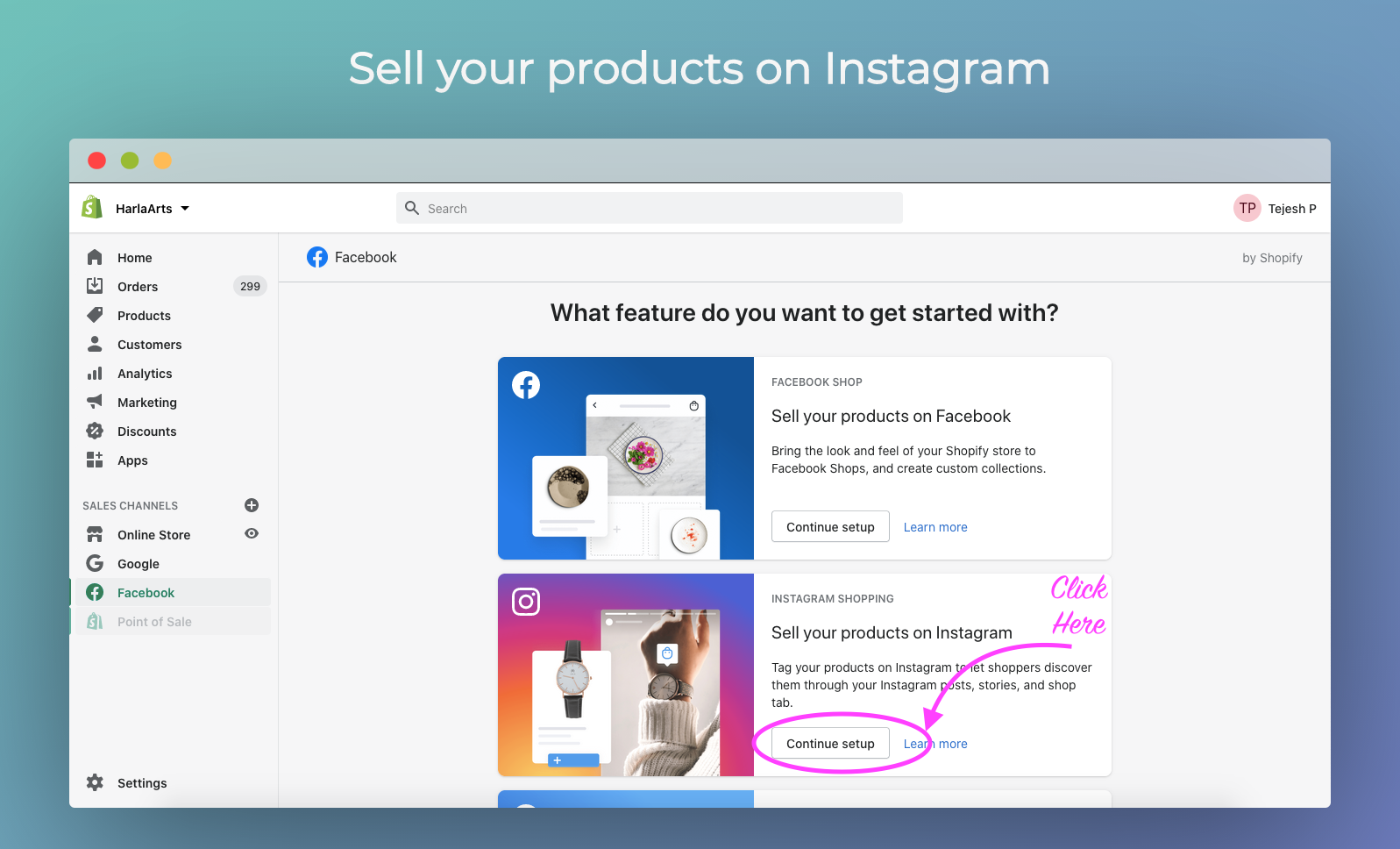 Click sell your products on Instagram
3. Click on ‘**Set up to start**’ in the ‘**Instagram Shopping**’ section
Click sell your products on Instagram
3. Click on ‘**Set up to start**’ in the ‘**Instagram Shopping**’ section
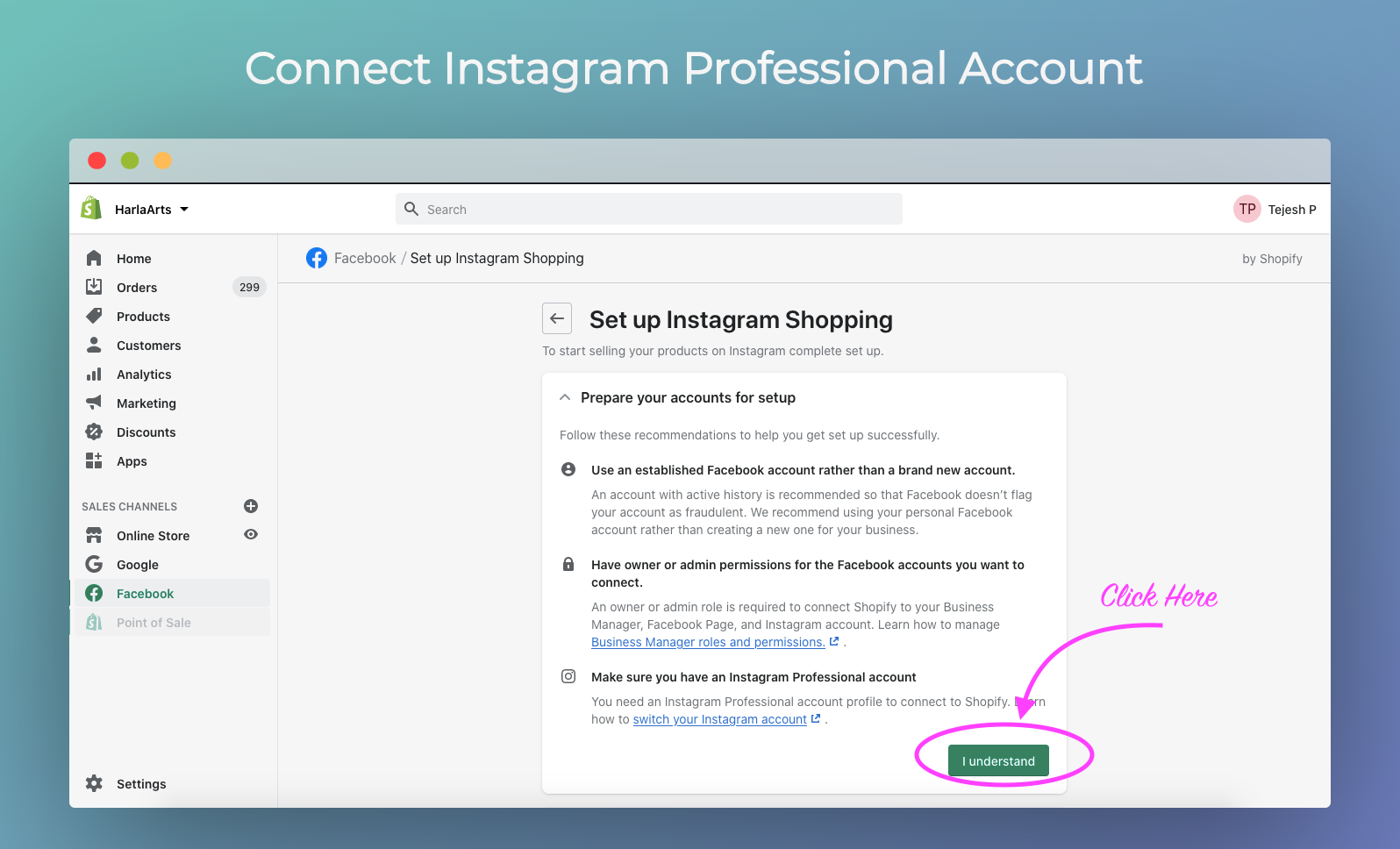 Connect Instagram professional account
4. Your brand’s **Facebook account** is to be connected to the Facebook sales channel.
Connect Instagram professional account
4. Your brand’s **Facebook account** is to be connected to the Facebook sales channel.
- After reviewing and accepting the terms & conditions, click on “Request Approval”
After these steps, Meta may review the account or products. Review timing varies, so use the status shown in your current Shopify and Meta admin rather than planning around a fixed window.
Promoting Instagram Shop
- Engage with Stories:
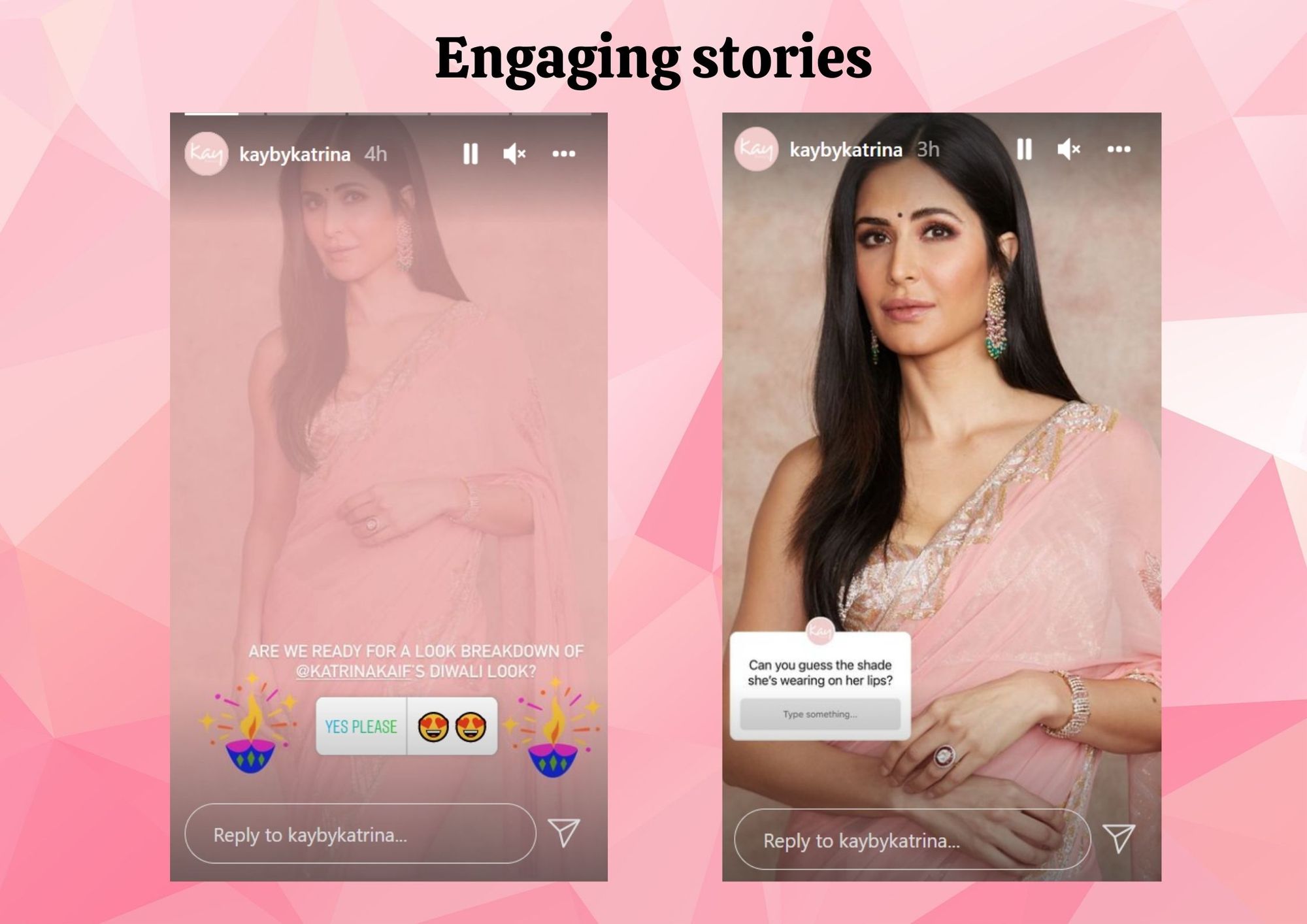 Kay Beauty uses stickers on the story to make it more engaging
Instagram stories are an essential feature of promotion. You can use polls, questions, live videos, adding music, and filters or countdowns to make the stories more engaging for the audience. Although the stories disappear after 24 hours, you can add them to IG Story Highlights to keep them for a long period of time.
Kay Beauty uses stickers on the story to make it more engaging
Instagram stories are an essential feature of promotion. You can use polls, questions, live videos, adding music, and filters or countdowns to make the stories more engaging for the audience. Although the stories disappear after 24 hours, you can add them to IG Story Highlights to keep them for a long period of time.
2. Boost through posts:
 Flipkart posts about the giveaway to encourage more participation
If your business is giving any offers, discounts or sales, make it known to your audience. Audience look at the post and ignore the caption. Thus, make use of it and showcase your products in sales or discounts to your audience. You can also tag them to promote it.
Flipkart posts about the giveaway to encourage more participation
If your business is giving any offers, discounts or sales, make it known to your audience. Audience look at the post and ignore the caption. Thus, make use of it and showcase your products in sales or discounts to your audience. You can also tag them to promote it.
3. Instagram Advertising:
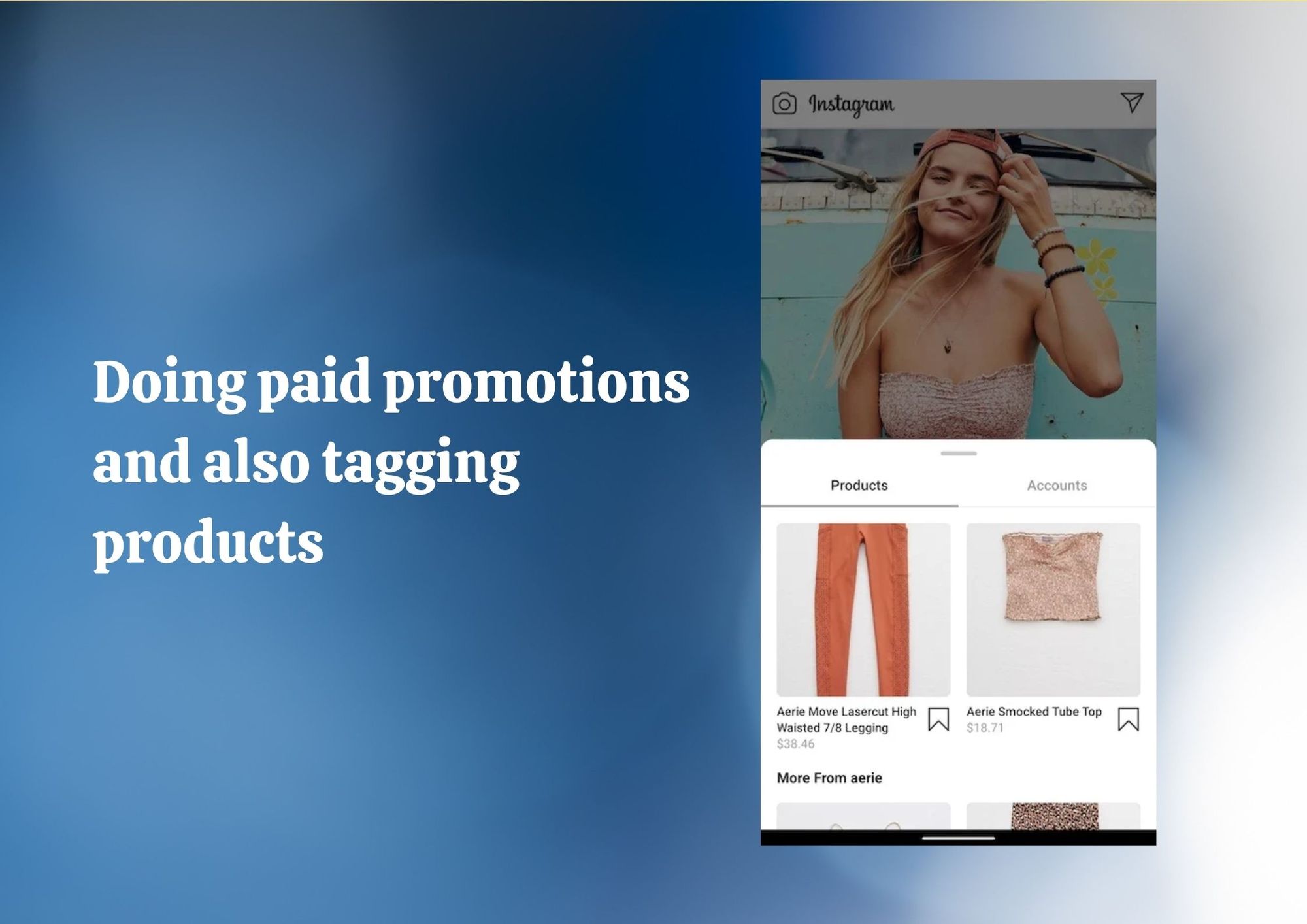 Tagging products in the paid advertisement has better conversions
Instagram ads are available to every user and it appears on the newsfeed of your audience. Promote your product-tagged shoppable posts for extra reach and engagement.
Tagging products in the paid advertisement has better conversions
Instagram ads are available to every user and it appears on the newsfeed of your audience. Promote your product-tagged shoppable posts for extra reach and engagement.
Tag products in IG posts
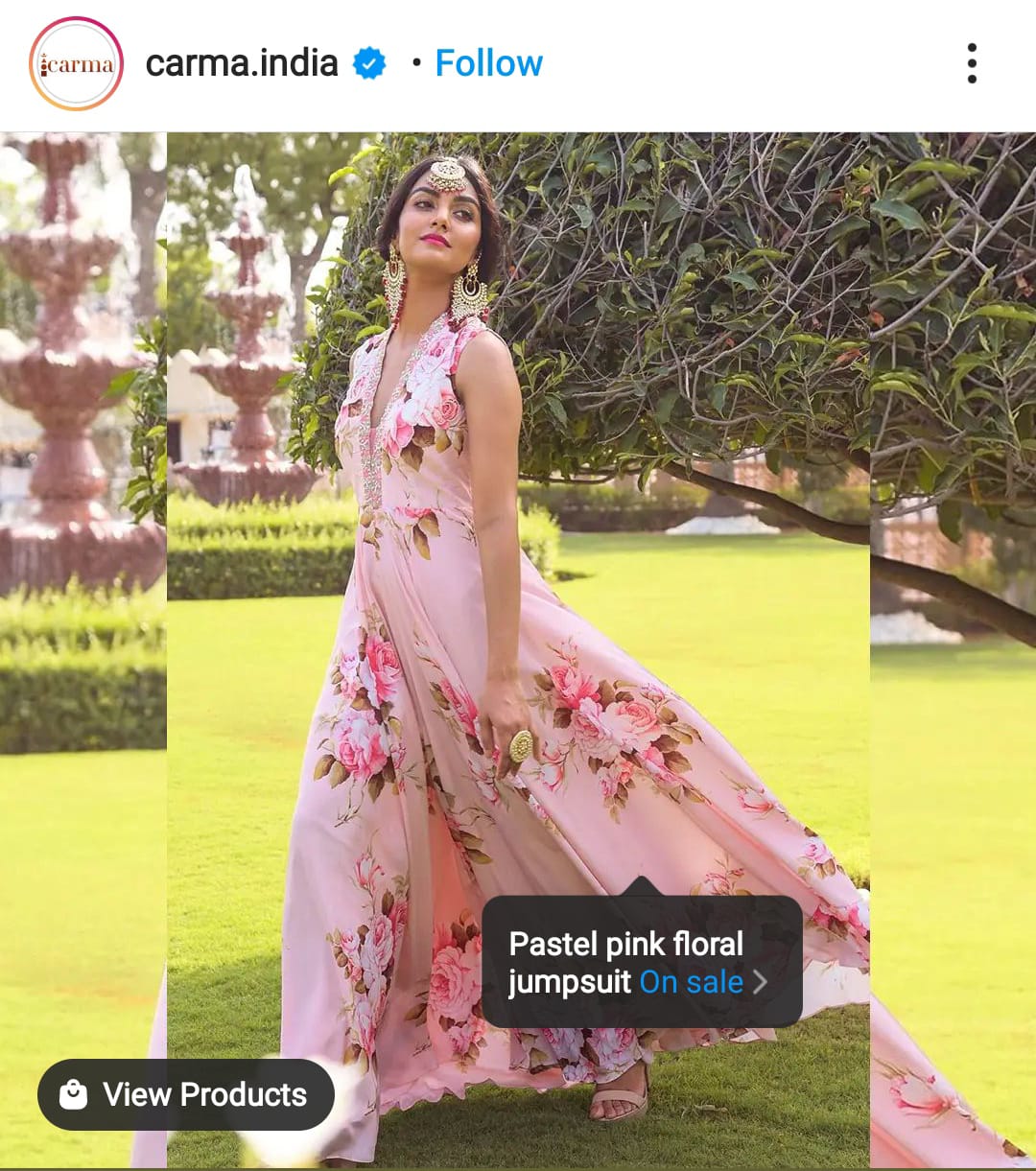 Instagram Shoppable posts help to direct traffic to the eCommerce site
IG shoppable posts permit eligible brands to tag products in a post. A shopper can open the product and continue to the brand’s Shopify website to add it to cart and check out.
Instagram Shoppable posts help to direct traffic to the eCommerce site
IG shoppable posts permit eligible brands to tag products in a post. A shopper can open the product and continue to the brand’s Shopify website to add it to cart and check out.
Optimize the posts for product tagging
Just product tagging will not solve the purpose. Therefore optimizing those posts is necessary too. 3 tips for you:
1. Influencer marketing:
Your business can leverage Instagram influencer posting about your products. You can add shopping tags to those posts. A customer trusts influencers’ recommendations more than your brand. Thus, this can organically boost your brand.
2. Create natural posts:
Your business profile must sell the products leveraging social proof which makes the sale a natural extension to adding value to customers. A constant methodology of tagging the products in the posts must be maintained.
3. Use the current Instagram Shopping controls:
Once the account and catalog are approved, use the profile shop and product-tag controls currently available to the account. Do not rely on an old fixed post-count requirement; Meta’s surfaces and eligibility rules can change.
Conclusion
Two things do most of the selling here: user-generated content and shoppable posts. UGC gives shoppers a reason to trust you; shoppable posts cut the steps between wanting the product and buying it.
So use the currently supported Story and post flows, then measure the path from profile to product page to Shopify checkout. Every tag should make the next step clearer for the shopper.